Domino's Pizza USA
Domino's Pizza LLCFood & Drink
4.6895.07K Reviews
- Version
- 13.11.3
- Installs
- 10.00M
- Age Rating
- Everyone
Screenshots

Our Review of Domino's Pizza USA
 Analysis by Appyee
I judge a food-ordering app less by the excitement of the first order than by whether it still saves effort when pizza becomes a familiar choice. Domino's Pizza USA is most useful when you already know you want Domino’s and want to build an order, send it through, and keep track of its progress without calling. It is free, developed by Domino's Pizza LLC, and sits in the Food & Drink category. For me, its lasting appeal depends less on novelty than on how often its ordering flow fits the way I actually eat.
The first-week appeal
On an early visit, the attraction is straightforward: the app turns a familiar menu into a guided ordering process. I can make choices on screen rather than explain a customized pizza over the phone, then check the order’s progress afterward. The simple premise is useful even if I don’t need a visual builder every time. I can use the app for a planned meal, a quick solo dinner, or a group order where people have different topping preferences.
That flexibility is where the customization has practical value. For a household order, I’d settle each person’s choices before checkout and review the cart as a group; this is less error-prone than trying to remember several requests while placing an order in a hurry. If I’m ordering just for myself, a simpler choice may be quicker than adjusting every detail. The builder is most helpful when customization matters, not as a step I need to take for every pizza.
The appeal is not only that the process feels convenient. A digital cart gives me a chance to pause before sending the order and check whether I’ve selected the right pizza and toppings. That small review is useful when ordering for other people, since a missed detail can matter more than a few extra seconds spent checking. I’d still ask everyone to make their choices before I begin rather than pass the phone around at the last moment.
Easy Peasy Ordering
First things first, the Domino's Pizza USA app makes ordering pizza as easy as pie—pun intended! With just a few taps, you can customize your pizza with all your favorite toppings. The interface is super intuitive, so even if you're not the most tech-savvy person, you'll find your way around without a hitch.
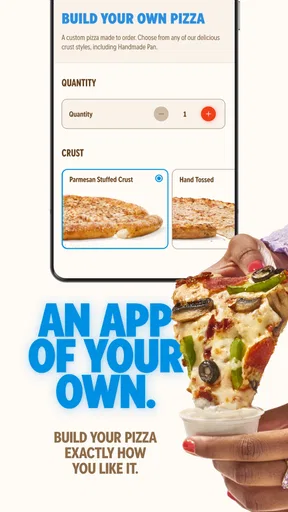
One of the coolest features is the "Pizza Builder," where you can visually craft your pizza masterpiece. Want extra cheese? Go for it! Feeling adventurous with pineapple? No judgment here. The app gives you the freedom to tailor your order exactly how you like it.
Tracking Your Pizza Journey
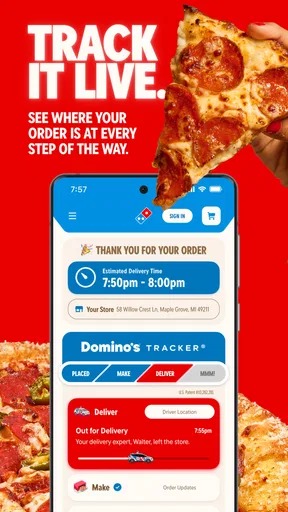
Now, here's something I personally love—the Pizza Tracker. You can literally watch your pizza's journey from the oven to your doorstep. It's oddly satisfying, and it keeps you in the loop so you know exactly when to expect that delightful knock on the door.
The tracker updates in real-time, showing you each stage of the process. I’ve found it particularly useful when hosting gatherings, as it allows me to time everything perfectly. No more guessing games!
What the tracker changes in everyday use
For a realistic example, imagine I’m hosting friends and need to coordinate dinner with people arriving at different times. I can place the order, use the progress updates to decide when to set out plates, and avoid repeatedly checking the door. I wouldn’t treat a status display as a guaranteed arrival time, though: it helps me follow the order’s progress, but I’d keep a little flexibility in the rest of the evening.
The tracker also makes more sense when I’m waiting at home than when I’m already on the move. If I’m running errands, checking a phone constantly is not much of a convenience, and a progress update can’t remove the need to be available when the order arrives. My practical tip is to order when someone can receive it and use the tracker as a guide, rather than planning a tight schedule around it.
Month-to-month value and the alternatives
The app is more compelling as a repeat-order tool than as something I’d open just to browse. If Domino’s is already my choice for a particular dinner, having the menu, customization, and progress tracking in one place reduces back-and-forth. By contrast, a general food-delivery app can be a better starting point when I’m deciding among several restaurants or comparing options across different cuisines. The Domino’s app is focused; that focus is an advantage when I know what I want and a limitation when I don’t.
Deals and rewards can add a reason to return, but I would compare the final order against what I actually plan to buy rather than assuming a promotion automatically makes the order worthwhile. A deal is useful if it fits the meal; it is less useful if it nudges me toward extra food I didn’t want. I’d check the offers while building the cart, then make the decision based on the full order and the people eating it, not on the excitement of a discount alone.
That approach also answers whether the app deserves a regular spot on my phone. If I order from Domino’s often enough to value a dedicated ordering route, it may earn that space through habit. If I only want pizza occasionally and usually choose whichever nearby restaurant looks best, a broader delivery service or the restaurant’s other ordering options may suit me better. The app’s value is recurring convenience, not a reason by itself to make Domino’s a more frequent meal.
Deals and Rewards Galore
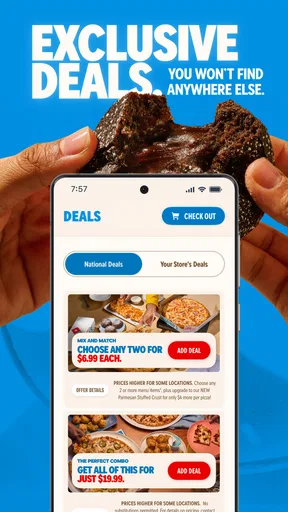
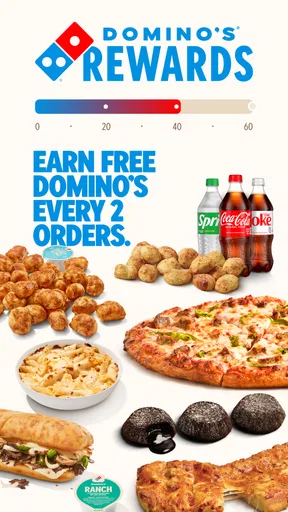
Let’s talk savings. The app frequently features exclusive deals and discounts that you won’t find anywhere else. If you’re like me and enjoy a good bargain, you’ll appreciate the value here. Plus, joining the Domino’s Rewards program is a no-brainer. Every order brings you closer to earning free pizzas. Who doesn’t love freebies?
And don't get me started on the ease of payment options. Whether you prefer to pay online or in cash upon delivery, the app accommodates your preferences seamlessly.
Keeping the routine simple
For regular use, I’d keep the process deliberate: decide on the meal, check the current choices and offers, build the order, and review it before confirming. That sequence is more useful than assuming the app will choose the best value for me. If I’m ordering for a group, I’d collect preferences first and verify the cart once; if I’m ordering for myself, I’d skip unnecessary customization. These small habits make the app feel like a practical shortcut instead of another place to browse.
People often want to know whether this is only for frequent customers. I don’t think it has to be: someone placing an occasional order can still benefit from an orderly customization process and status updates. But the more occasional the order, the less important it is to keep a dedicated app ready. Someone who values comparing many restaurants in one search may find a multi-restaurant service more useful, while a Domino’s regular is more likely to appreciate the focused experience.
Room for Improvement
Of course, no app is perfect. I’ve noticed that during peak hours, the app can slow down a bit. It’s not a deal-breaker, but something to keep in mind if you’re ordering during the weekend rush. Also, while the app is generally user-friendly, a few more customization options for the user interface would be a nice touch.
Maintenance, fatigue, and who should skip it
The maintenance burden seems modest: I’d keep the app only if I use its ordering and tracking often enough to justify having it installed, and I’d make sure it is current when I do rely on it. Its current version is 12.12.0, and it requires Android 9 or later on Android devices. It is rated for Everyone, has a 4.6 average from around 2.4 million ratings, and has been installed over 10 million times. Those figures suggest broad use, but they don’t tell me whether the local ordering experience will suit a particular person.
Fatigue is more likely to come from the routine than from the interface. Repeating the same kind of order can make any food app feel like an extra stop, and promotions can lose their pull if I’m not actively looking for a deal. I would skip this app if I rarely order Domino’s, prefer to choose among many restaurants each time, or would rather place an order through another channel. I’d also avoid depending on it as my only plan for a tightly timed event; ordering convenience does not make dinner timing certain.
One useful trade-off is that a dedicated restaurant app keeps the experience centered on Domino’s rather than turning the decision into a comparison exercise. That can reduce friction for a familiar order, but it also means I should do my own comparison when price, variety, or another restaurant matters more. I’d use the app when the restaurant choice is settled, not as a substitute for deciding what meal makes sense.
Long-term verdict
Overall, the Domino's Pizza USA app is a fantastic tool for satisfying those pizza cravings with minimal fuss. It’s efficient, user-friendly, and packed with features that cater to every pizza enthusiast’s needs. Whether you're planning a solo pizza night or feeding a crowd, this app has got you covered. Just remember to keep an eye on those deals—your wallet will thank you!
For me, it earns lasting space when Domino’s is a recurring choice: customization helps with specific preferences, and the tracker gives the wait a clearer structure. It is less convincing as a general food-discovery app, and its usefulness can dip when service is busy or I don’t need to order from this chain. I’d recommend it to people who regularly choose Domino’s and want a direct way to organize an order; occasional customers can decide based on whether those conveniences outweigh keeping another app installed.
Privacy and Permissions
See what permissions an app requests and how it handles your data.
- Location
- approximate location (network-based), precise location (GPS and network-based)
- Phone
- directly call phone numbers, read phone status and identity
- Photos/Media/Files
- read the contents of your USB storage, modify or delete the contents of your USB storage
- Storage
- read the contents of your USB storage, modify or delete the contents of your USB storage
- Microphone
- record audio
- Wi-Fi connection information
- view Wi-Fi connections
- Device ID & call information
- read phone status and identity
- Other
- view network connections, pair with Bluetooth devices, expand/collapse status bar, full network access, run at startup, reorder running apps, control vibration, prevent device from sleeping, read Google service configuration
Verdict
Strengths of Domino's Pizza USA
- User-friendly interface, easy navigation.
- Quick order tracking with real-time updates.
- Customizable pizza options for all tastes.
- Frequent promotions and discounts offered.
- Loyalty program rewards regular customers.
Limitations of Domino's Pizza USA
- Limited payment options for some users.
- Occasional app crashes during peak hours.
- Delivery areas may be restricted.
- Menu can be overwhelming for new users.
- Notifications can be excessive at times.
Similar Picks in This Category
View All
Rappi: Food Delivery, Grocery
Rappi, Inc - Delivery3.5

McDonald’s: Cupons e Delivery
Arcos Dorados4.3

Swiggy: Food Instamart Dineout
Swiggy4.7

Blinkit: Groceries & more
Blinkit4.8

foodpanda: food & groceries
Foodpanda GmbH a subsidiary of Delivery Hero SE4.0

Zomato: Food Delivery & Dining
Zomato4.7
Frequently Asked Questions
What features does the Domino's Pizza USA app offer?
The Domino's Pizza USA app provides a range of features designed to enhance your ordering experience. You can customize your pizza, track your order in real-time with the Domino's Tracker, and save your favorite orders for quick reordering. Additionally, the app offers exclusive deals, a store locator, and various payment options, including contactless payment.
Is the Domino's Pizza USA app user-friendly?
Yes, the Domino's Pizza USA app is known for its intuitive and user-friendly interface. The app is designed to make navigation straightforward, with clear categories for menu items, easy customization options for orders, and a simple checkout process. Users have reported that the app is quick and efficient, making the pizza ordering process hassle-free.
Does the app offer exclusive deals or discounts?
The Domino's Pizza USA app frequently provides exclusive deals and discounts that are not available elsewhere. This includes special promotions, combo offers, and limited-time discounts. By using the app, customers can take advantage of these savings, which are updated regularly to provide the best value possible.
How secure is the Domino's Pizza USA app for payments?
The Domino's Pizza USA app prioritizes security for all transactions. It uses encryption to protect your payment information and offers secure payment options, including credit/debit cards and PayPal. Additionally, the app supports contactless payment methods, ensuring a safe and secure transaction process for users.
Can I track my order using the Domino's Pizza USA app?
Yes, one of the standout features of the Domino's Pizza USA app is the Domino's Tracker. This feature allows you to track your order in real-time from preparation to delivery. It provides updates on the status of your order, ensuring you know exactly when to expect your pizza at your doorstep.
